


























Whatever business you choose to digitalize, moving on to the cloud becomes another most crucial decision. Whether it is about infrastructure support, offering higher performance, flexibility, or innovation, the cloud provides solutions that accelerate their growth.
Cloud remains one of the most trending topics, and research says that more than 94% of the organizations are at least using one cloud-based platform that helps secure their data. During the global pandemic, there was a rise in digital transformation, and businesses started to adopt the usage of the cloud.
Research by Gartner predicts that cloud spending will rise higher than IT spending. Once the business decides to make a move to the cloud, you must ensure to choose the right cloud service provider. The article covers all the appropriate details that lead you to select the right service provider.
Key Takeaways
- Before selecting a cloud provider, clearly define your business’s workload requirements, size, growth plans, and security needs.
Choose a provider that offers strong encryption, identity and access management (IAM) systems, and robust disaster recovery plans.
- Look for providers with high uptime guarantees (e.g., 99.99%), low latency, and the ability to scale resources easily as your needs grow.
- Choose a cloud provider that offers 24/7 customer support and has a solid track record of resolving issues quickly.
- Avoid vendor lock-in by opting for a provider that supports open standards and easy data migration options.
What is the cloud service provider, and when to choose?
A cloud service provider refers to a third party that offers services including network, infrastructure, business applications, and more on the cloud. Whether it is about managing your private cloud, public cloud computing services offer efficiency. One of the popular examples is Amazon Web Services (AWS), with around 32% of the market share.
Now, before you select your service provider, you must consider several factors. You need to understand your specific business requirements and clarify them. Based on the technical, security, and other service management requirements, you can efficiently select your group of service provider.
What are the different types of cloud?
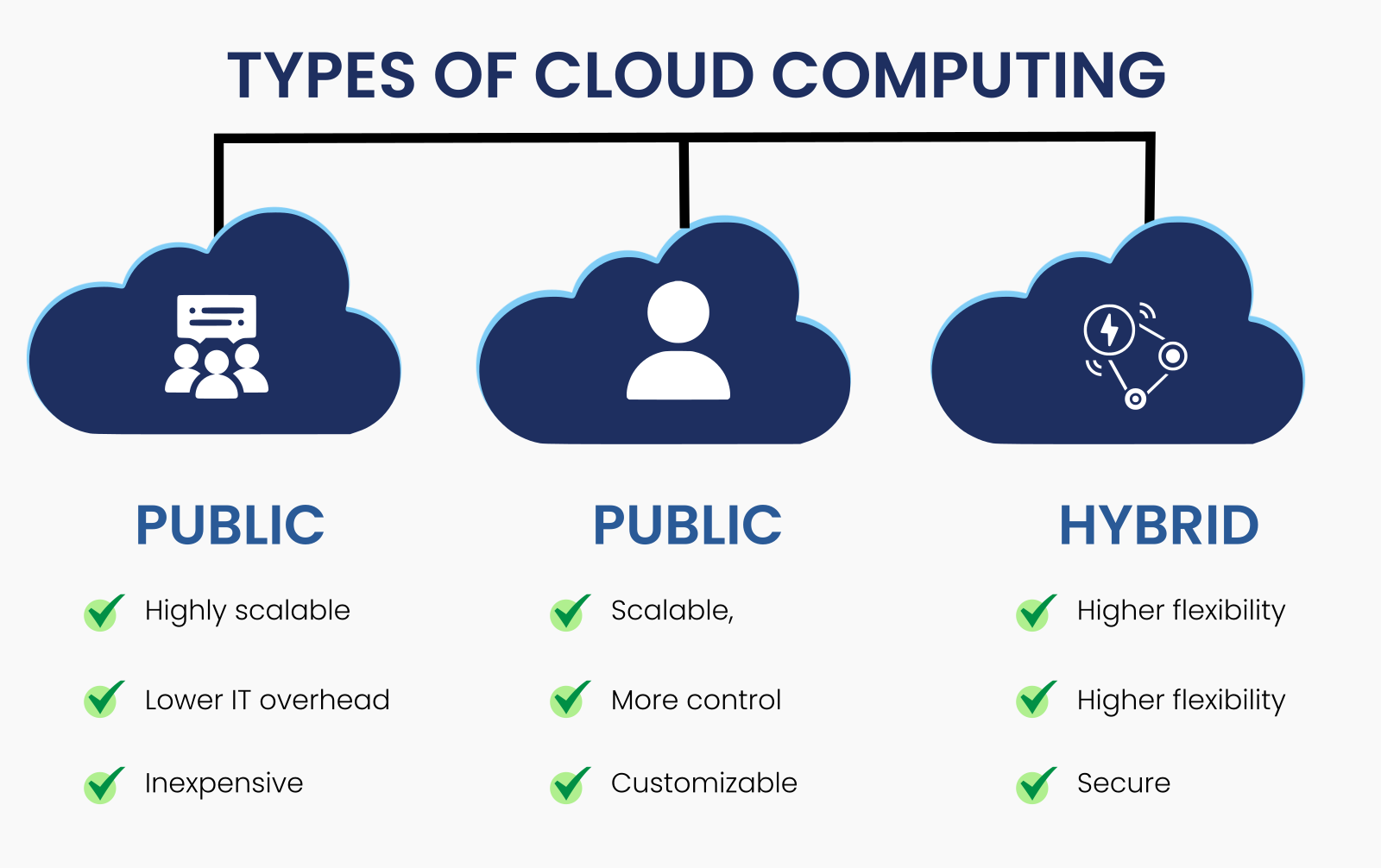
1. Public Cloud
The public cloud refers to cloud infrastructure that is owned, operated, and managed by a third-party cloud service provider. In this model, computing resources such as servers, storage, and applications are shared among multiple users or organizations. End users do not own the infrastructure; instead, they access services over the internet on a subscription or pay-as-you-go basis.
Public clouds are highly scalable, cost-effective, and easy to deploy, making them ideal for startups, small businesses, and enterprises with fluctuating workloads. Since maintenance, upgrades, and security of the underlying infrastructure are handled by the provider, businesses can focus more on innovation and growth.
2. Private Cloud
A private cloud is dedicated to a single organization or a specific group of users. Unlike public clouds, private clouds operate in a fully isolated environment, offering greater control, security, and customization. The infrastructure may be hosted on-premises or by a third-party provider, but the organization is responsible for managing and maintaining the cloud environment.
Private clouds are best suited for businesses with strict data privacy, compliance, or regulatory requirements, such as healthcare, finance, or government sectors. They offer enhanced security, predictable performance, and the ability to customize infrastructure according to specific operational needs.
3. Hybrid Cloud
A hybrid cloud combines both public and private cloud environments into a single, unified IT infrastructure. These environments are connected through secure networks such as LANs or VPNs, allowing data and applications to move seamlessly between them.
Hybrid cloud models offer the best of both worlds - security and control from private clouds along with the scalability and cost-efficiency of public clouds. Businesses can store sensitive data in a private cloud while using public cloud resources for less critical workloads, testing, or peak demand scenarios.
What are the main categories of Cloud Computing?
There are generally three categories of cloud services offered by the cloud service provider. IaaS, PaaS, and SaaS facilitate the data flow from user to clients via the Internet.
1. Infrastructure-as-a-Service (IaaS)
Infrastructure-as-a-Service (IaaS) is one of the foundational layers of cloud computing. In an IaaS model, the cloud service provider is responsible for managing and providing all the essential infrastructure elements, such as servers, storage, networking, and data centers. Essentially, the cloud provider offers a virtualized environment, allowing users to rent computing resources on-demand rather than investing in and maintaining their physical hardware.
2. Platform-as-a-Service (PaaS)
Platform-as-a-Service (PaaS) goes a step beyond IaaS by providing not just infrastructure but also a development platform and tools for building, testing, and deploying applications. In a PaaS model, the cloud service provider handles the infrastructure, operating systems, and middleware, while the user focuses on creating and managing their applications.
3. Software-as-a-Service (SaaS)
Software-as-a-Service (SaaS) is the most complete and user-friendly cloud service model. In SaaS, the cloud provider hosts software applications and makes them available to users via the internet, typically through a web browser. Users do not need to worry about installation, updates, or hardware management. SaaS is the "end product" of cloud computing, offering fully functional software that is accessible over the internet.
Challenges associated with using Cloud Service Provider
1. Performance Challenges
Performance is one of the main factors when you are opting for cloud solutions. If cloud performance is not up to the mark the users might rush away and your business, of course, suffer from the losses. Performance issues include outages, downtime, and other technical issues.
2. Privacy and Security
Data security and privacy are major concerns when you choose cloud computing services. Cloud rises the fear of cyber-attacks, threats while increasing the vulnerabilities beyond the perimeter. Cloud service providers must ensure data encryption security and control. The issue includes security that is reduced if you hire the right service provider that takes up the responsibility.
3. Hidden Cost
With the cloud, you may have to bear extra expenses not included in the ROI. The data needs in between or other things can lead to hidden charges. Therefore, the company must factor in the additional need for staffing and monitor cloud use.
4. Lack of Knowledge and Expertise
Cloud can not be managed by anyone. It requires in-depth knowledge and expertise to work upon. Many organizations claim to provide the best services, but choosing the right one for your business leads to success.
Areas for consideration to choose the right service Provider
The choice for the best cloud service provider depends on several factors, and you must consider them. Below are the important points you must not forget to consider.
1. Check For Certifications And Norms
The service provider should adhere to all the norms and must have a reputed certification. They must comply with the best industry practices and standards to demonstrate quality services. There are plenty of certifications available, and you must check how your organization plans and maintain adherence to these standards.
2. Technologies And Support
The right cloud service provider offers support that is as per your business standards and technical environment. They must consider the architecture of your company environment and assess the amount of re-coding the whole process would need, whether you are looking for migration or other support.
3. Performance And Reliability
The roles and responsibilities of the service provider are verified. Whether it is downtime management, disaster recovery plans, your service provider must be able to solve all the complex challenges while evaluating the reliability and performance. One of the methods to check their performance is by validating the cloud service provider against their SLA for the last months. Choosing a GPU Dedicated Server can help ensure high performance and stability in demanding workloads.
4. Service Roadmap And Technologies
Businesses must have a clear idea about the roadmap of the cloud service provider and must ensure that it is the right fit for their organization. Do ask a lot of queries before you hire them. A few of them are - Is the service provider ready to offer you innovative services and solve complex issues? Are you upgraded with the latest technologies and upgraded over time?
Before selecting a cloud provider, clearly define your business’s workload requirements, size, growth plans, and security needs.
Choose a provider that offers strong encryption, identity and access management (IAM) systems, and robust disaster recovery plans.
Look for providers with high uptime guarantees (e.g., 99.99%), low latency, and the ability to scale resources easily as your needs grow.
Choose a cloud provider that offers 24/7 customer support and has a solid track record of resolving issues quickly.
Avoid vendor lock-in by opting for a provider that supports open standards and easy data migration options.With all these answers, you will have a clear idea about the service provider, and they would easily be able to fulfill your intense needs and promises.
5. Price
The process of cloud migration is a costly affair, and choosing the right plan is one of the most crucial decisions. You must specify the budget you are ready to spend on cloud infrastructure and then compare the different service providers before your final decision.
6. Check for Company Profile
Businesses to avail of the services at a lower cost should never compromise with the quality. Therefore, working with a reputed and result-oriented cloud service provider helps you make a difference. Check for the reviews, managers, cost, and consider every factor before you make up the final decision.
Benefits of choosing the right Cloud Service Provider
Flexibility of Work
One of the most significant advantages of cloud services is the flexibility it offers to businesses and employees. With cloud technology, employees no longer need to be tied to a physical office or specific devices. They can access files, data, and applications from any location with an internet connection. This flexibility enables remote work, which can enhance work-life balance and productivity. Employees can work from home, on the go, or even from other countries, making cloud services a powerful tool for modern businesses aiming for a more agile workforce.
Scalability
Cloud services provide unparalleled scalability, meaning businesses can easily adjust resources as their needs grow or fluctuate. Unlike traditional IT systems that require significant upfront investments in hardware and infrastructure, the cloud allows companies to scale up or down depending on demand. Whether you're a startup with growing needs or an established enterprise managing complex projects, cloud services enable seamless expansion without the hassle of managing on-site hardware. Additionally, businesses can save time and resources by leveraging cloud infrastructure, which automatically accommodates changes in demand without requiring manual upgrades or replacements.
Business Continuity
Ensuring the continuous operation of your business is critical, especially in an age where data security is a growing concern. Cloud service providers offer robust solutions for business continuity by safeguarding your data and applications. In the event of a disaster, such as a cyberattack, hardware failure, or natural disaster, your data remains secure and accessible. Cloud platforms often include automatic backup systems, disaster recovery plans, and redundant data storage, all of which contribute to minimizing downtime and ensuring that your business operations can continue uninterrupted. With cloud services, your company can have peace of mind knowing that your critical data is protected and readily available, even in the face of unexpected disruptions.
Cost Savings
One of the most attractive features of cloud computing is the cost-saving potential it offers. Traditional IT infrastructure often requires large capital investments in hardware, software, and maintenance. However, with cloud services, businesses pay only for the resources they use, usually on a pay-as-you-go or subscription basis. This approach reduces the need for upfront costs and eliminates the expense of maintaining physical hardware. Additionally, cloud services often include built-in support, security, and software updates, which saves businesses from the cost of hiring dedicated IT staff for these tasks. By only paying for what they need and when they need it, companies can redirect their financial resources toward other key areas of their business, ultimately leading to better overall financial management and growth.
Winding-up!
Lack of proper planning and not choosing the right service provider can ruin your cloud migration, leading to common failures. Many cloud service providers offer customized cloud services as per your business needs.
Relying on ToXSL Technologies is one of the best decisions, as we are a leading and top-notch provider of cloud services that ultimately take your business in the right direction. We have an efficient and experienced team who understands your concern and help build secure solutions. Choose as your cloud service provider, and we ensure to never let you down!
Frequently Asked Questions
1. What is a custom SaaS application?
A custom SaaS application is a cloud-based software solution that is specifically designed and developed to meet the unique requirements of a business or target audience. Unlike off-the-shelf SaaS products, it offers tailored features, workflows, integrations, and scalability aligned with specific business goals.
2. How is a custom SaaS application different from ready-made SaaS software?
Ready-made SaaS software is built for a broad audience and offers limited customization, whereas a custom SaaS application is designed to address specific business processes. Custom SaaS provides greater flexibility, better integration capabilities, enhanced security, and long-term scalability.
3. What are the key benefits of developing a custom SaaS solution?
The main benefits include personalized functionality, seamless integration with existing systems, improved user experience, stronger data security, scalability, and a competitive edge in the market. Over time, custom SaaS solutions can also be more cost-effective than recurring subscription-based tools.
4. What challenges should businesses expect when building a custom SaaS application?
Common challenges include higher initial development costs, longer development timelines, technical complexity, scalability planning, and ongoing maintenance. However, these challenges can be mitigated with proper planning, the right technology stack, and an experienced development team.
5. Is a custom SaaS application suitable for small and mid-sized businesses?
Yes, custom SaaS applications can be suitable for small and mid-sized businesses, especially if they have unique workflows or growth plans. By starting with a minimum viable product (MVP) and scaling gradually, businesses of any size can benefit from a custom SaaS solution without excessive upfront investment.