























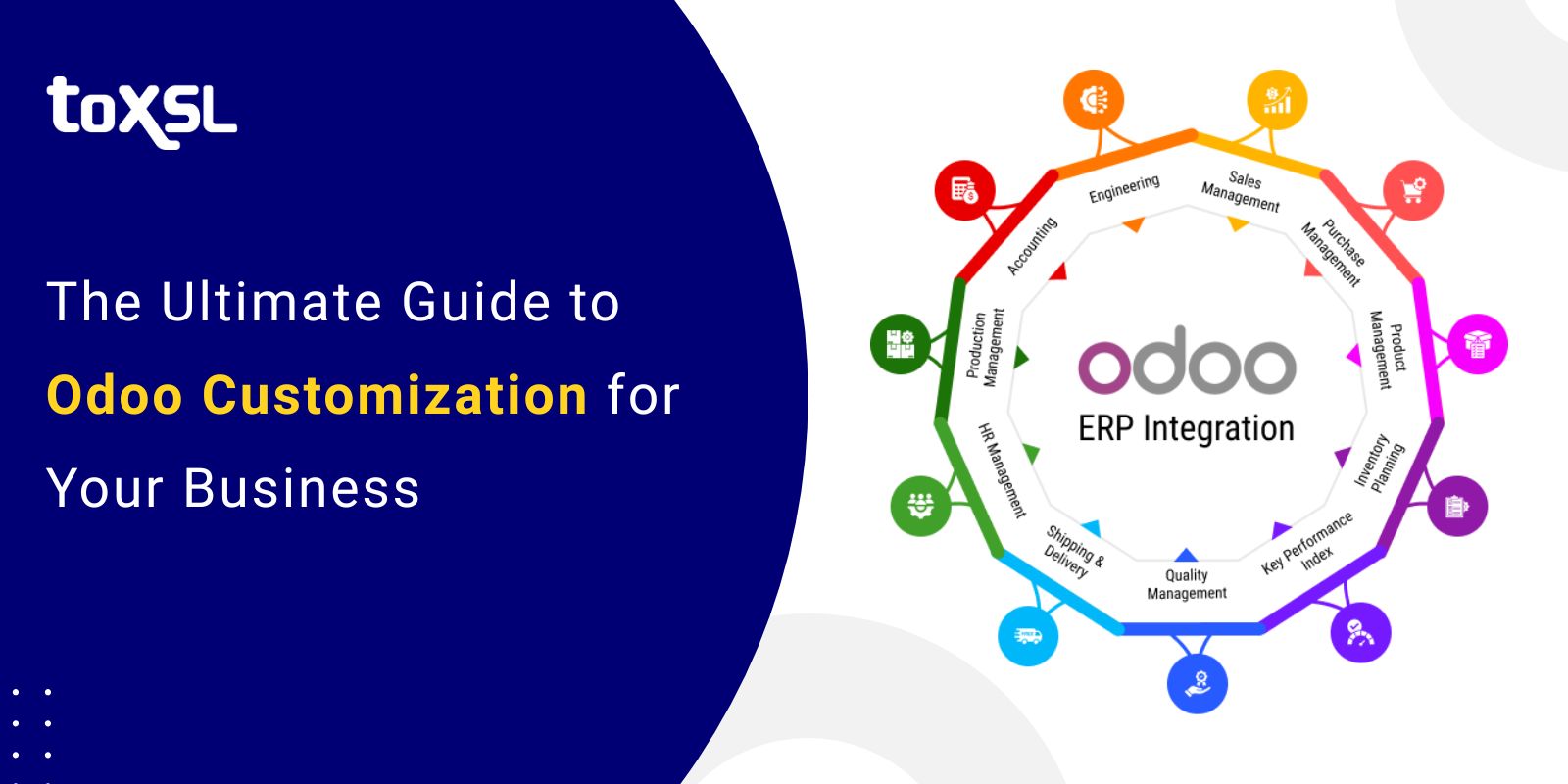
How can businesses keep up with the ever-evolving demands of digital transformation? What if the key to streamlining operations, improving collaboration, and driving growth could be found in a single solution? In today’s business environment, the need for efficient, integrated systems has increased, and companies are turning to powerful ERP solutions to streamline operations, enhance collaboration, and drive growth. Among these, Odoo has emerged as a top choice across industries, offering a modular, all-in-one platform that integrates CRM, accounting, inventory, HR, eCommerce, and more into a single system.
Odoo serves more than 13 million users worldwide and is actively used across over 175 countries, reflecting its broad global adoption. Its flexible architecture and open-source foundation have helped Odoo capture a significant share of the ERP market, particularly among small and medium-sized businesses seeking cost-effective, scalable solutions.
According to industry estimates, the Odoo customization market, including implementation, integration, and consultancy services, is projected to grow rapidly through the end of the decade, as more organizations look to tailor the platform to their unique workflows and business goals.
With such momentum in adoption and a vibrant ecosystem of modules and partners, customizing Odoo to fit your business needs is not beneficial, it’s often a strategic imperative.
Key Takeaways
- Odoo customization helps businesses adapt the platform to their specific workflows, reducing manual tasks.
- Customized modules and dashboards allow teams to access relevant information quickly, improving decision-making.
- Odoo can integrate with other third-party tools and applications, ensuring a smooth flow of data across your business ecosystem.
- As your business grows, customized Odoo modules can be scaled and modified to meet evolving needs.
- Custom interfaces and dashboards simplify navigation, making it easier for employees to adopt the system.
- Targeted customization eliminates unnecessary features, helping businesses focus on modules that provide real value.
Top Benefits of Odoo Customization for Businesses
Customizing Odoo can transform a standard ERP system into a business-centric powerhouse. While Odoo offers a wide range of default features, tailoring it to your unique operational needs unlocks
significant advantages. Here’s a deep dive into the key benefits:
1. Business-Specific Functionality
Every organization operates differently, with its own processes, workflows, and priorities. Odoo customization ensures the ERP system aligns perfectly with your specific requirements. Instead of forcing your business to adapt to software limitations, you can configure Odoo to match your operational model, whether it’s unique inventory management rules, specialized accounting processes, or custom sales workflows.
2. Automation of Repetitive Tasks
Manual data entry, repetitive approvals, and time-consuming reporting can drain resources and increase the likelihood of errors. Customized Odoo workflows automate routine tasks, such as generating invoices, sending notifications, or updating inventory, freeing your team to focus on strategic work rather than mundane tasks.
3. Enhanced Reporting
Out-of-the-box ERP systems offer standard reporting tools, but your business may require more detailed or specialized insights. Odoo customization allows you to build custom dashboards, KPIs, and reports that provide real-time insights into operations. Decision-makers can access exactly the data they need to identify trends, track performance, and optimize resource allocation.
4. Improved User Experience
A one-size-fits-all ERP interface can be confusing and difficult to navigate, leading to low adoption among employees. Customizing Odoo interfaces, such as menus, dashboards, forms, and data entry screens, creates a smoother and more intuitive experience. Employees spend less time learning the system and more time performing tasks efficiently.
5. Seamless Integration
Businesses often rely on multiple software solutions, including CRM, eCommerce platforms, payment gateways, logistics tools, and marketing systems. Custom Odoo integration ensures smooth data flow across these platforms, reducing data duplication and improving operational efficiency. For example, syncing sales orders from your online store directly into Odoo inventory and accounting modules saves hours of manual effort.
6. Scalability and Future-Proofing
As businesses grow, their processes evolve. Odoo customization allows your ERP system to scale alongside your business. You can add or modify modules without disrupting operations, ensuring that your ERP system remains relevant and effective even as your company expands or diversifies.
7. Cost Efficiency
Although customization requires upfront investment, it eliminates unnecessary features and optimizes workflows, ultimately reducing operational costs. By focusing only on functionalities that deliver tangible business value, organizations save on both software overhead and labor costs over time.
8. Competitive Advantage
A customized Odoo system offers unique insights and operational efficiencies that competitors without tailored solutions may lack. Faster decision-making, automated workflows, and data-driven strategies allow your business to respond more quickly to market changes and customer needs.
Also Read: Odoo ERP Integration: A Complete Guide for Business Automation
Best Practices for Seamless Odoo Customization
Customizing Odoo can unlock tremendous value for your business, but poorly executed customizations can lead to system instability, upgrade difficulties, and wasted resources. Following best practices ensures your Odoo customization is efficient, scalable, and aligned with your business goals. Here’s an in-depth look at key practices:
1. Define Your Requirements
Before diving into customization, it’s critical to conduct a thorough analysis of your business processes. Identify pain points, workflow inefficiencies, and functional gaps that need addressing. This step ensures that your customization efforts are focused on solving real business problems rather than adding unnecessary features.
- Conduct workshops with key stakeholders from all departments.
- Map existing workflows and identify bottlenecks.
- Prioritize customizations based on ROI and business impact.
2. Adopt a Modular Approach
Odoo is designed to be modular, with independent apps and features that can be enabled or customized as needed. A modular approach ensures that:
- Customizations are confined to specific modules rather than the core system.
- System upgrades remain seamless, reducing the risk of breaking features.
- Future enhancements or additions can be implemented without affecting other areas.
3. Focus on User Experience (UX)
Even the most powerful ERP system is ineffective if employees struggle to use it. Customizations should prioritize simplicity, intuitiveness, and accessibility:
- Simplify menus and navigation paths for frequently used features.
- Customize dashboards to provide relevant insights for different user roles.
- Ensure forms and screens reduce redundant data entry and are visually intuitive.
4. Maintain Robust Documentation
Every customization should be carefully documented, including:
- The purpose of the change and expected business impact.
- Technical details, such as modified modules, fields, and workflows.
- Testing procedures and results.
Comprehensive documentation helps in troubleshooting, onboarding new team members, and ensuring smoother upgrades in the future.
5. Perform Rigorous Testing
Testing is critical to ensure that customizations work as intended and do not disrupt existing workflows. Implement:
- Unit testing for individual modules.
- Integration testing for workflows spanning multiple modules.
- User acceptance testing (UAT) with real business scenarios before deployment.
Testing minimizes errors, prevents data loss, and ensures a smooth rollout across the organization.
6. Plan for Scalability and Future Upgrades
Businesses evolve, and so should your ERP system. When customizing Odoo:
- Avoid changes that modify the core codebase, as these can complicate future upgrades.
- Design workflows that can scale with increasing data volumes or user numbers.
- Use Odoo Studio or modular extensions where possible to reduce technical debt.
7. Engage Experienced Odoo Professionals
Working with experienced Odoo developers and consultants ensures that customizations are implemented efficiently, securely, and in line with best practices. Professionals can:
- Suggest optimal ways to implement custom workflows.
- Ensure compliance with industry standards and data security requirements.
- Provide ongoing support and maintenance post-implementation.
8. Regularly Review and Optimize
Customization is not a one-time activity. Regularly assess your Odoo system to:
- Identify unused or redundant features.
- Optimize workflows based on changing business needs.
- Incorporate feedback from users to improve usability and efficiency.
Odoo Services Offered by ToXSL Technologies
At ToXSL Technologies, we understand that every business is unique. That’s why we offer comprehensive Odoo services designed to help organizations streamline operations, improve efficiency, and achieve long-term growth. With years of experience in Odoo development, customization, and implementation, we provide end-to-end solutions tailored to your business needs. Here’s how we can help:
1. Odoo Customization
We specialize in customizing Odoo to match your exact business requirements. From modifying existing modules to developing entirely new ones, our team ensures that the system adapts to your workflows, rather than the other way around.
- Custom module development for unique business processes
- Dashboard and report customization for actionable insights
- Automation of repetitive tasks to save time and reduce errors
- Modular approach to maintain smooth upgrades and scalability
Our goal is to make Odoo a perfect fit for your business, enhancing efficiency and user experience across departments.
2. Odoo Consultancy
Strategic guidance is crucial for successful ERP adoption. At ToXSL, we provide expert Odoo consultancy services to help you make informed decisions:
- Business process analysis to identify gaps and opportunities
- Module recommendations tailored to your requirements
- Implementation and customization roadmap for maximum ROI
- Best practices guidance to optimize system usage
We ensure that your Odoo deployment aligns with your business goals and drives measurable results.
3. Odoo Implementation
Our team handles the entire Odoo implementation process, ensuring a smooth transition from planning to execution:
- Installation and configuration of core and optional modules
- Custom workflow setup and user access management
- Data migration from legacy systems with full accuracy
- Comprehensive employee training for quick adoption
We focus on delivering a fully functional Odoo system that is ready to optimize your operations from day one.
4. Odoo Migration
Upgrading or migrating to a new Odoo version can be complex, but we make it seamless:
- Safe migration from older Odoo versions or legacy systems
- Reconfiguration of workflows, reports, and dashboards to match current business needs
- Post-migration testing to ensure accuracy and stability
- Guidance on utilizing new features for enhanced efficiency
Our migration services help businesses stay current, competitive, and ready for growth.
5. Odoo Integration
We enable your Odoo system to communicate seamlessly with other applications and platforms:
- eCommerce platform integration
- Payment gateway and banking system integration
- CRM, marketing, and logistics tool integration
- Custom API development for proprietary software connections
Our integrations ensure smooth data flow, reduce manual entry, and give you a unified view of your business.
6. Odoo Configuration
Proper configuration is key to maximizing Odoo’s potential. At ToXSL, we configure Odoo to match your organization’s structure and requirements:
- Module configuration to align with business processes
- User roles, permissions, and workflow setup
- Customization of fields, forms, and reports for optimal usability
- System optimization for performance, scalability, and security
With our configuration services, your Odoo system will operate efficiently and support your business growth for years to come.
Top Mistakes to Avoid When Customizing Your Odoo System for Success
1. Failing to Define Clear Objectives
2. Over-Customizing Too Early
3. Ignoring User Training
4. Underestimating Data Migration Challenges
5. Not Considering Scalability
6. Overlooking Integration Needs
7. Neglecting Ongoing Support and Updates
8. Disregarding User Feedback
Conclusion
At ToXSL Technologies, we believe that a well-customized ERP system is the backbone of a successful business. Odoo customization allows organizations to streamline processes, improve operational efficiency, and gain actionable insights tailored to their unique needs.
With our expertise in Odoo customization, consultancy, implementation, migration, integration, and configuration, we empower businesses to leverage the full potential of Odoo. By partnering with us, you not only get a system that works seamlessly for your current operations but also a scalable solution that grows with your business.
Our goal is to make Odoo work for you, not the other way around. From understanding your business requirements to delivering a fully functional, optimized, and user-friendly ERP system, ToXSL Technologies is committed to ensuring your Odoo journey is smooth, efficient, and future-ready.
Let us help you transform your business processes, automate workflows, and gain a competitive edge through expert Odoo solutions. Contact us to learn more.
Frequently Asked Questions (FAQs)
1. Why should my business choose Odoo for its ERP needs?
Odoo is a highly flexible, open-source ERP platform that offers a complete suite of business applications, from CRM and accounting to inventory, HR, and eCommerce. Its modular structure and customization capabilities make it ideal for businesses of all sizes looking for scalability, affordability, and streamlined operations.
2. How does Odoo customization benefit my business?
Customization allows Odoo to align perfectly with your unique workflows, processes, and goals. Instead of adapting your business to generic software, we tailor features, modules, and dashboards so your team can work faster, smarter, and more efficiently.
3. How long does Odoo implementation take?
The implementation timeline varies based on your business size, the complexity of workflows, and customization needs. A basic implementation can take a few weeks, while a more advanced, multi-module setup may take several months. At ToXSL Technologies, we follow a structured approach to ensure timely and smooth deployment.
4. Can you migrate my existing data to Odoo without data loss?
Yes. We perform secure and accurate migration of data from legacy systems or older Odoo versions. Our process includes data mapping, cleansing, testing, and validation to ensure that all essential information is transferred safely and remains fully functional in the new system.
5. Does ToXSL Technologies provide post-implementation support?
Absolutely. We offer ongoing maintenance and support to ensure your Odoo system runs smoothly. Our team assists with troubleshooting, updates, performance optimization, and additional enhancements as your business evolves.
6. Can Odoo integrate with our existing third-party applications?
Yes. Odoo supports robust integrations with CRM systems, eCommerce platforms, payment gateways, logistics tools, marketing software, and more. We also develop custom APIs to ensure seamless communication between Odoo and any external applications your business relies on.